
01 · Settle in
Getting started
Open this activity from the app. If it offers a choice of mode, read the differences below before starting.
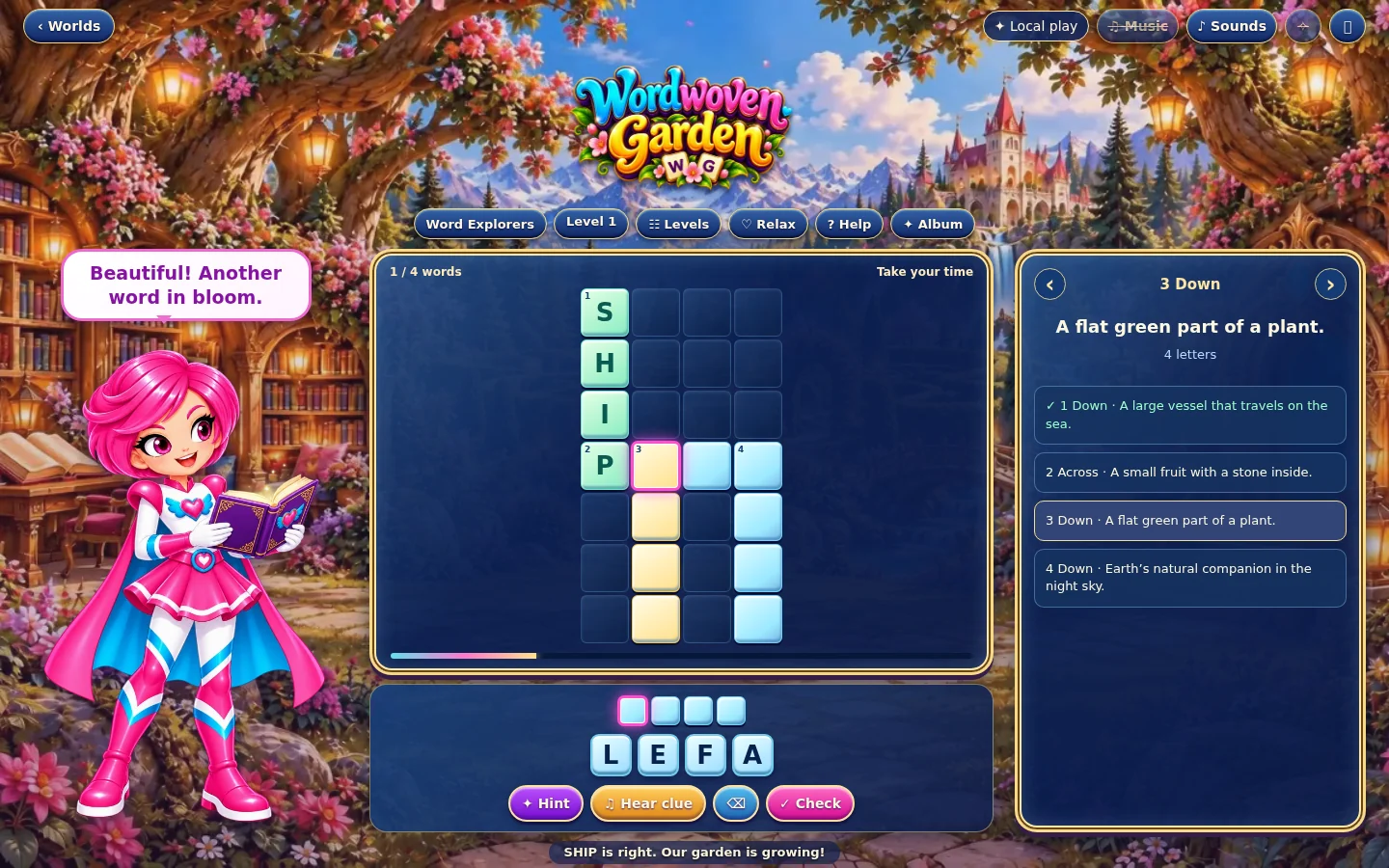
- Choose Little Sprouts, Word Explorers, Story Seekers or Master Wordweavers, then choose Relax or Challenge and press Play.
- Tap a clue arrow or an unfinished square to select a word. Read its number and Across or Down label. On desktop you can also choose from the clue list.
- Tap the letter tray or use your keyboard. The same letter button can be used more than once. Tap an editable square to change a letter, or use the erase button.
02 · Make a little magic
How to play
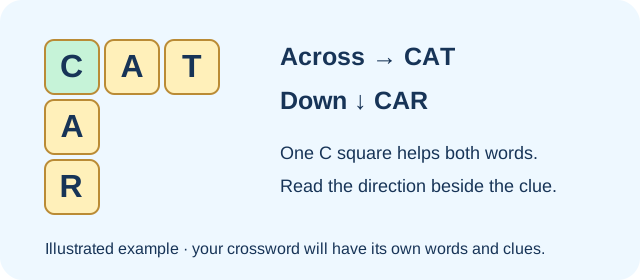
Choose an unfinished word. Across reads left to right; Down reads from top to bottom. Two words may begin at the same numbered square.
Read the clue or press Hear clue to hear Gina’s approved recording. In Little Sprouts, use the picture and copy the word shown.
Fill each editable square. Correct crossing letters are shared with the other word and remain locked. For a repeated letter, tap the same letter button again.
Press Check when the whole word is entered. A correct word turns green and the game moves to an unfinished clue. An incorrect complete word receives a gentle try-again message; revise it before checking again.
Finish every word to complete the crossword. A keepsake pop-up appears briefly, then the next puzzle opens automatically. Use Next puzzle to continue sooner, and Album to see earned keepsakes later.
03 · Know your world
Objects & controls
Use this field guide alongside the picture and the labels inside the game.
- Clue number and direction
- Across is horizontal and Down is vertical. A shared starting square may belong to both directions; follow the clue label and highlighted squares.
- Clue arrows
- Move between unfinished clues while words remain to solve.
- Letter tray
- Choose the letters for the selected word. Buttons are reusable, including two or more copies of the same letter.
- Word boxes and board
- The outlined square is the current entry position. Tap an editable box or square to correct a letter. Green completed crossing letters cannot be erased.
- Check
- Checks the selected complete word. It does not submit individual letters. Missing letters must be filled before a check is counted.
- Hint
- Reveals one missing or incorrect letter. Relax allows unlimited hints; Challenge allows three per crossword.
- Hear clue
- Plays the selected clue in Gina’s approved voice. Music, sound effects and animation have separate controls in the top bar.
- Little Sprouts
- Picture clues and words to copy, with a small crossword for early readers.
- Word Explorers
- Short written clues and a letter tray containing the letters needed.
- Story Seekers
- Longer words and extra letters in the tray, so read each clue carefully.
- Master Wordweavers
- More challenging clues with the full alphabet available.
- Levels, Album and Worlds
- Levels lets you choose unlocked puzzles. Album holds your keepsakes. Worlds returns to the Wonder Worlds selection.
04 · Your goal
Modes & passing levels
- Relax has unlimited checks and hints, with no countdown timer.
- Challenge allows three hints and a check allowance equal to the number of words plus three. Both correct and incorrect complete-word checks use the allowance. Watch the checks-left counter.
- If the allowance runs out before the crossword is complete, use Retry or switch to Relax. A correct final allowed check can still complete the puzzle.
- Stars reflect hint use and mistakes: three stars for no hints or mistakes, two for at most two of each, and one otherwise.
- New crossword selects a fresh puzzle; Back to my puzzle resumes the current one. Combinations rotate from a finite word bank, so individual words may return.
05 · A helping hand
Helpful tips
- Start with a clue you know. Its crossing letters can help you solve another word.
- For example, a four-letter musical instrument with R in the third square can be HARP. It goes Across when the four highlighted squares run left to right.
- A number labels a starting square, not a direction. Read Across or Down beside the clue when two words share the start.
- Do not spend a hint merely because a letter appears twice. The letter buttons can be tapped repeatedly.
- In Challenge, read the complete word once more before pressing Check. Incorrect-word voice feedback plays only after checking a complete word, and respects the Sounds setting.
- Keepsakes and puzzle stars are separate from spendable Sparks. Repeating a recorded completion does not automatically award more Sparks.
06 · Before you leave
Progress & Sparks
The game’s score, stars, hearts and magic are different from your family’s spendable Sparks. The app confirms any Sparks awarded under the current account rules, waiting periods and daily limits.
Use the game’s menu to leave and allow any save or reward confirmation to finish. If the app reports a connection or saving problem, keep that message in mind before closing. Guest saving can differ from signed-in profile saving.
These instructions do not unlock paid content or spend Sparks. The app shows the current preview and access options.