
01 · Settle in
Getting started
Open this activity from the app. If it offers a choice of mode, read the differences below before starting.
- Drag an ornament towards its immediate neighbour, or tap two neighbouring ornaments. Match at least three in a horizontal or vertical line. Diagonal swaps do not count.
- A swap that makes no match returns without costing a move. Objective pieces stay in their squares; tap one for an explanation.
- Use the arrow keys to move focus between neighbouring squares and Enter or Space to select. On touchscreens, swipe or tap.
- Music and sound effects have separate top controls. Full screen uses the Gina app’s display controls; the board adapts to portrait and landscape.
- Use Worlds to return to the game list, Levels to revisit nearby reached levels, Restart for a fresh attempt and ? for help.
02 · Make a little magic
How to play
Read the objective above the board before moving. Points alone do not complete a level.
Swap adjacent ornaments to form a line of three or more. New pieces fall into the spaces and can create further matches automatically.
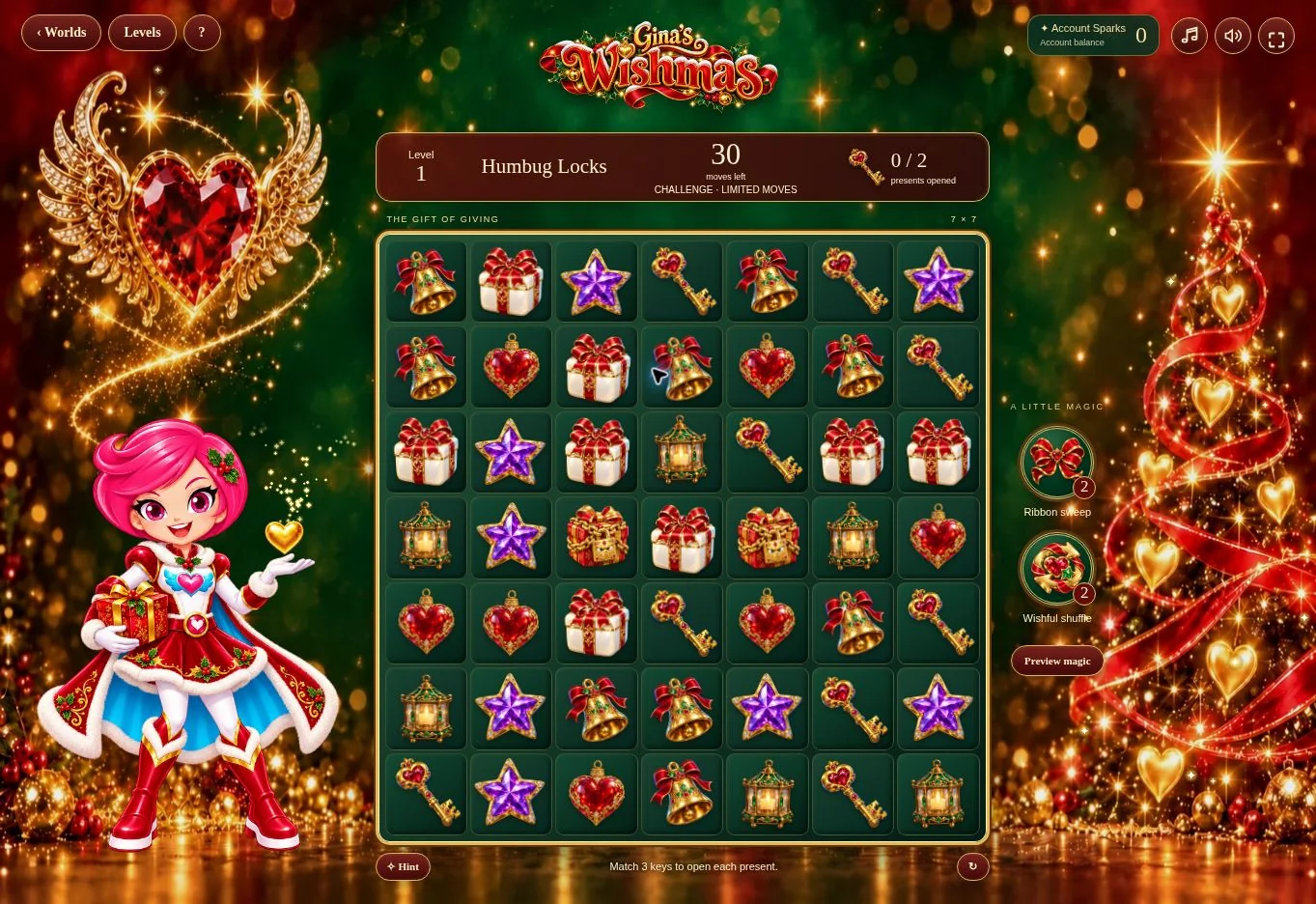
For Humbug Locks, match golden keys anywhere on the board. Three collected keys open one locked present. Open both presents to win.
For the Miser’s Purse, match coins until six are collected. The purse opens and releases a golden row-clearing burst.
For the Humbug Clock, match bells until six are collected. The clock awakens and frees its chained presents.
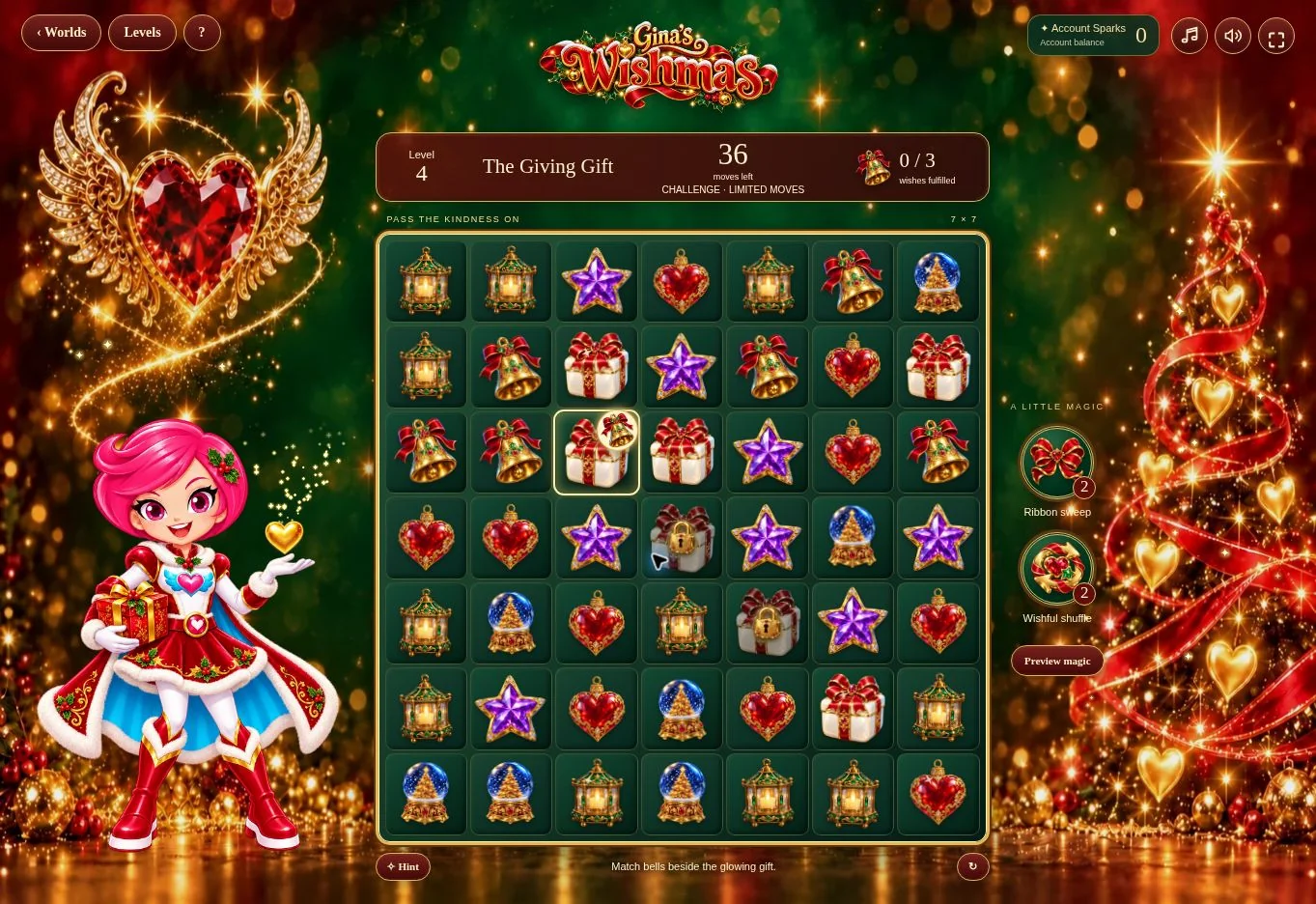
For the Giving Gift, read the badge on the glowing gift. Make a match of that ornament with at least one matched square sharing an edge with the gift. Its opening animation passes kindness to the next present. Fulfil all three wishes in order.
Complete the objective, wait for the result and any account confirmation, then choose the next level.
03 · Know your world
Objects & controls
Use this field guide alongside the picture and the labels inside the game.
- Ornaments
- Bells, heart baubles, lanterns, snow globes, stars and presents are the ordinary match-three pieces. Keys and coins appear for their objectives.
- Charged ornament
- A match of four or more creates a charged ornament. Matching it clears its row and column.
- Humbug Lock
- A chained present opened by collecting golden keys. It cannot be swapped.
- The Miser’s Purse
- Collect six matched coins to open it and trigger its golden row sweep.
- The Humbug Clock
- Collect six matched bells to awaken it and release its presents.
- The Giving Gift
- The glowing present shows its requested ornament on a small badge. Match that ornament directly beside it. A distant match, wrong ornament or booster-only clear does not fulfil the wish.
- Small golden lock
- This Giving Gift is waiting. Fulfil the glowing gift’s wish first; the ribbon then unlocks the next present.
- Ribbon sweep
- Select an ordinary ornament, then tap Ribbon sweep to clear ordinary pieces in its row. With no selection, the middle row is cleared. Objective pieces stay in place. Each new attempt has two sweeps; the button does not spend account Sparks.
- Wishful shuffle
- Rearranges ordinary ornaments while preserving objective pieces and progress. Each new attempt has two shuffles; the button does not spend account Sparks.
- Hint
- Highlights a legal swap. For the Giving Gift it looks for a wish-fulfilling move first; otherwise the hint may help rearrange the board without immediately completing a wish.
- Points and account Sparks
- Board points are game score. The balance at the top comes from the Gina account; the server confirms any reward separately.
04 · Your goal
Modes & passing levels
- Relax has no timer and no move limit. Take time to explore matches and enjoy the effects.
- Challenge has no timer but limits moves: 30 for Locks, Purse and Clock; 36 for the Giving Gift. Finish the objective before moves run out.
- Choose the mode from Worlds before opening the connected game. Relax and Challenge keep separate boards and progress for the selected child.
- Levels continue with generated arrangements and rotating objectives. There is no fixed final chapter. If no valid move remains, ordinary pieces reshuffle automatically.
- Challenge arrangements are not guaranteed to be solvable within the move allowance. Retry with another strategy when needed.
05 · A helping hand
Helpful tips
- For a Giving Gift, position the requested ornaments beside the active present. Matching the correct ornament elsewhere will not open it.
- Look for matches of four to create charged pieces and for cascades that collect more of the objective’s resource.
- Allow the gift-opening film and ribbon animation to finish. Input waits while the sequence plays. The device’s reduced-motion setting shortens effects and replaces the gift film with a still image.
- Progress saves after a resolved move. Connected play uses the selected child’s cloud save; the downloadable test saves only in that browser. Avoid closing during an animation or save.
- Account rewards follow the family platform’s current settings. A pending completion keeps the same receipt when retried. No separate game wallet is created.
- Parents manage access through the existing family and catalogue controls. Free levels and full access follow the admin policy. A locked level opens Gina’s existing unlock panel; its free-level option returns to level 1 without buying.
- If sound is silent, tap Music after beginning play and check device volume. If saving or access cannot connect, keep the saved game and retry when online. Open installed Wishmas from Worlds rather than its direct game address.
06 · Before you leave
Progress & Sparks
The game’s score, stars, hearts and magic are different from your family’s spendable Sparks. The app confirms any Sparks awarded under the current account rules, waiting periods and daily limits.
Use the game’s menu to leave and allow any save or reward confirmation to finish. If the app reports a connection or saving problem, keep that message in mind before closing. Guest saving can differ from signed-in profile saving.
These instructions do not unlock paid content or spend Sparks. The app shows the current preview and access options.