
01 · Settle in
Getting started
Open this activity from the app. If it offers a choice of mode, read the differences below before starting.
- Open Wishing Grove from Wonder Worlds with your Family profile selected.
- Tap or click an empty tile to plant, or use the arrow keys and Enter.
- Use the displayed Move and Thaw controls when you have enough power.
- Music and action sounds have separate controls. Use fullscreen for more space.
- Use Worlds to return or Levels to replay completed gardens. Keep the game open if it reports a pending cloud save.
02 · Make a little magic
How to play
Read the garden’s line length and target. Choose an empty tile to plant a pink Heartflower.
The Spirit plants blue Moonflowers. Form the required number of your flowers in a horizontal, vertical or diagonal line.
A completed line earns you a Bloom. A Spirit line earns Frost for the Spirit. Reach the displayed target first to restore the garden.
After a line, the flowers clear and the starting side alternates. A drawn board also begins a fresh round, retaining scores and powers.
From level 4, the second player may claim the opening flower instead of planting. Claiming uses their whole turn.
Complete a line through the golden bud to earn one power, up to two. Spend a power to Move your flower to an adjacent empty tile, or to Thaw frost and plant.
Watch for changing water and a row that shifts right with the breeze in later gardens. Follow the countdown and highlighted row.
03 · Know your world
Objects & controls
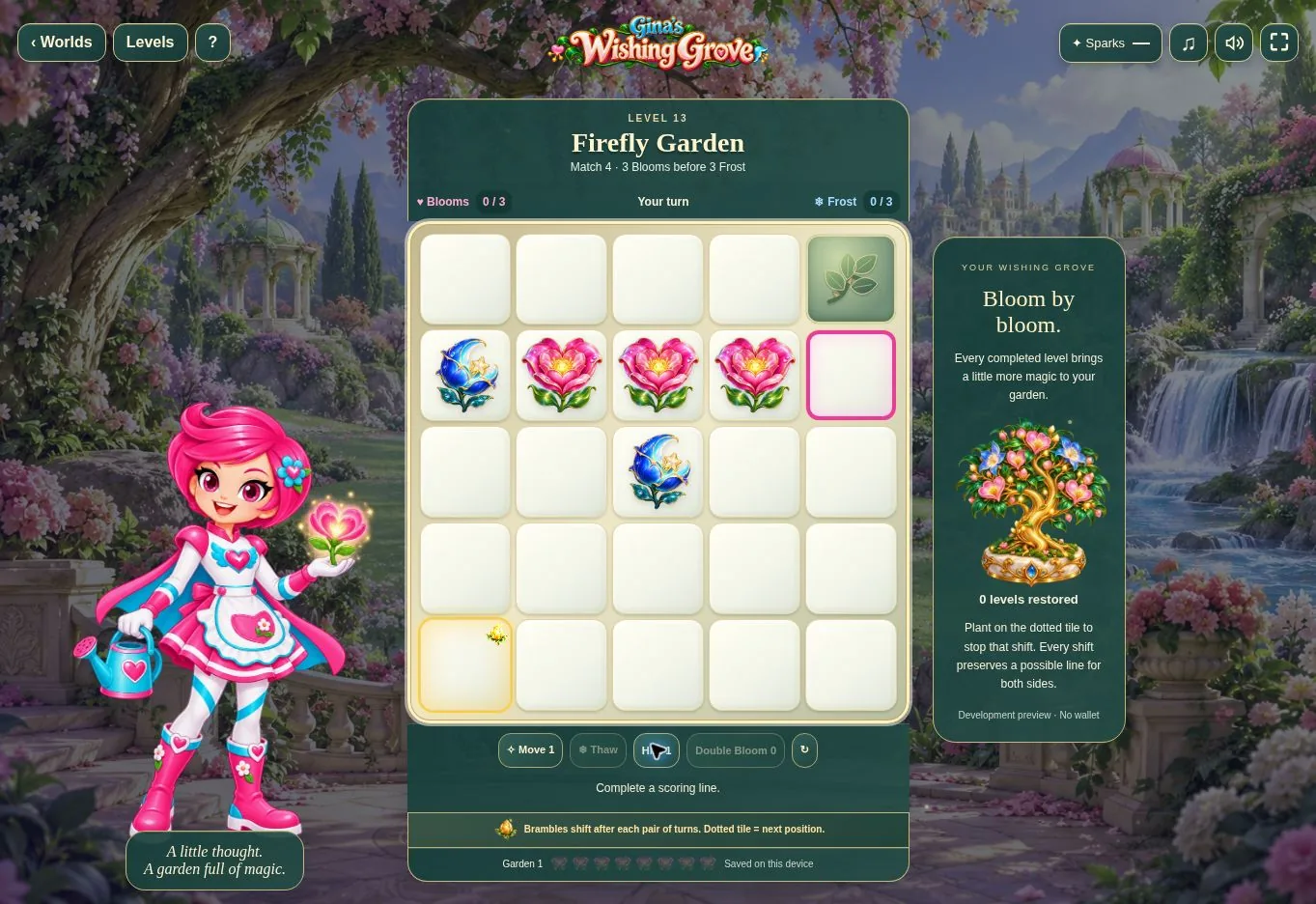
Use this field guide alongside the picture and the labels inside the game.
- Heartflowers
- Your pink flowers. Arrange them into the required line.
- Moonflowers
- The Spirit’s blue flowers. Watch its possible lines as well as your own.
- Blooms and Frost
- The round scores for you and the Spirit. Reach the garden’s displayed target first.
- Golden bud
- A line through this tile earns one power, up to two. The bud moves every four turns.
- Move
- Costs one power and shifts your flower to an adjacent empty tile.
- Thaw
- Costs one power, removes frost and plants. These powers are separate from account Sparks.
- Water and breeze
- Later gardens introduce changing water and a row that shifts right. Watch the highlighted row and countdown.
04 · Your goal
Modes & passing levels
- Restore 100 gardens over ten chapters, then continue with Evergreen Challenges.
- Levels 1–3 introduce the game gently. Current preview and unlock options are shown in the app.
- From level 4, the second player can claim the opening flower. The Spirit does so only when it values that opening more highly than another available position.
- A line ends that round and clears the flowers before the next round. A draw keeps the scores and powers for the fresh board.
- Frost appears only after a Spirit line, not as an automatic takeover.
- Use Levels to replay completed gardens.
05 · A helping hand
Helpful tips
- Check the required line length and target at the start of each garden.
- Look for the Spirit’s next possible line before planting.
- Consider the golden bud when planning a line, but keep your garden target in mind.
- Remember that claiming the opening flower uses a whole turn.
- Allow progress saving to finish before closing the game.
06 · Before you leave
Progress & Sparks
The game’s score, stars, hearts and magic are different from your family’s spendable Sparks. The app confirms any Sparks awarded under the current account rules, waiting periods and daily limits.
Use the game’s menu to leave and allow any save or reward confirmation to finish. If the app reports a connection or saving problem, keep that message in mind before closing. Guest saving can differ from signed-in profile saving.
These instructions do not unlock paid content or spend Sparks. The app shows the current preview and access options.