
01 · Settle in
Getting started
Open this activity from the app. If it offers a choice of mode, read the differences below before starting.
- Open Letter Lanterns from Wonder Worlds and select your Family profile to continue your progress.
- Read the clue, then tap a letter or type it on your keyboard.
- Use the free letter hint when you need a little help. There is one hint per word.
- Music and action sounds have separate controls. Use the fullscreen button for more space.
- Use Worlds to return to the catalogue, or Levels to replay available levels.
02 · Make a little magic
How to play
Read Gina’s clue and look at the empty lanterns to see the length of the hidden word.
Choose a letter. Every matching position lights up when your guess is correct.
An incorrect letter sends one firefly away with a gentle sound. All fireflies return for the next word.
If you are unsure, use your one free letter hint for that word.
Complete the answer, then read its discovery fact. You can continue learning even when a word defeats you.
Continue through five words and the final mystery word to complete the level.
03 · Know your world
Objects & controls
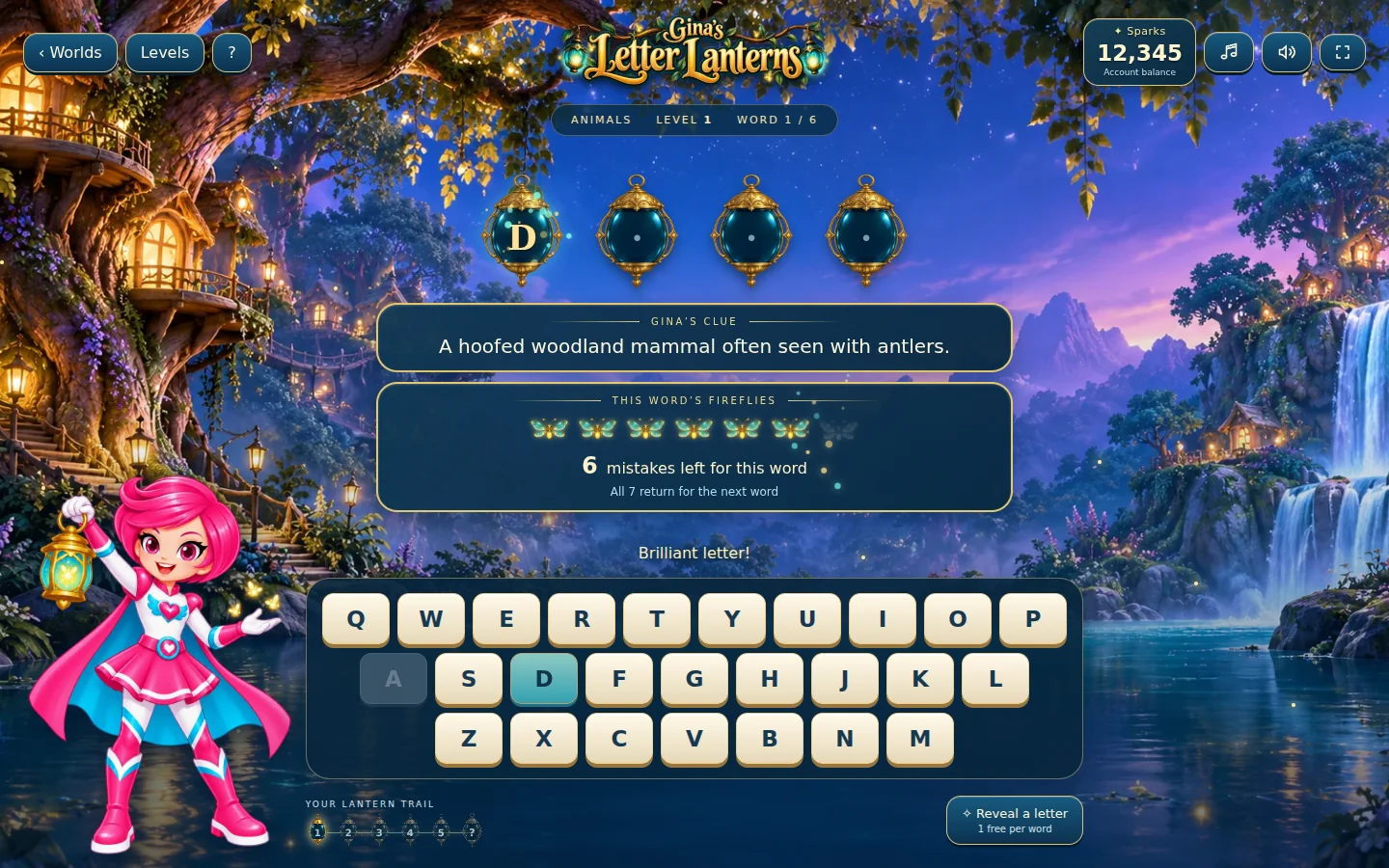
Use this field guide alongside the picture and the labels inside the game.
- Letter lanterns
- Each lantern represents a letter in the hidden word. Matching guesses reveal the letters.
- Fireflies
- These show the remaining incorrect guesses for the current word. They return for the next word.
- Gina’s clue
- Read this before guessing. It points towards the answer.
- Letter hint
- Reveals a letter to help you, once per word.
- Discovery fact
- Read a fact after each answer before continuing.
- Levels
- Revisit available levels with a fresh selection of words.
04 · Your goal
Modes & passing levels
- There is no timer: take time to read, think and choose.
- Each level contains five words followed by a final mystery word.
- Levels 1–5 introduce easier words. Levels 6–20 add intermediate vocabulary; level 21 onwards includes advanced words.
- Themes rotate as you progress. New attempts shuffle words within the level’s difficulty band, with no repeats until the relevant theme and difficulty pool has been used.
- Reopening an unfinished game preserves the current word and guesses. Replaying a level draws a fresh selection.
- The app shows the current free levels and unlock options.
05 · A helping hand
Helpful tips
- Read the whole clue before selecting a letter.
- Look at the letters already revealed to narrow down the possibilities.
- Use the free hint when it would help you make progress.
- Read the discovery fact even when you did not find the answer.
- Play in portrait on mobile, or landscape on desktop and tablet.
06 · Before you leave
Progress & Sparks
The game’s score, stars, hearts and magic are different from your family’s spendable Sparks. The app confirms any Sparks awarded under the current account rules, waiting periods and daily limits.
Use the game’s menu to leave and allow any save or reward confirmation to finish. If the app reports a connection or saving problem, keep that message in mind before closing. Guest saving can differ from signed-in profile saving.
These instructions do not unlock paid content or spend Sparks. The app shows the current preview and access options.