

01 · Settle in
Getting started
Open this activity from the app. If it offers a choice of mode, read the differences below before starting.
- Tap or click a score slot, then a note key or Rest to edit it.
- Use Play Score to hear one part, Play all scores to hear the mix and Stop to stop playback.
02 · Make a little magic
How to play
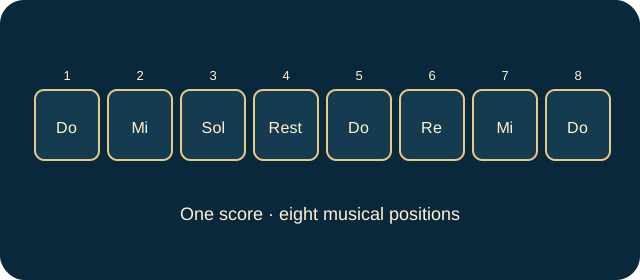
In Compose, choose a score and its instrument. Each score contains eight note positions.
Select each position and enter a note or rest. Add more scores, up to six, for different instruments.
Set tempo from 60 to 160 BPM and choose one to four repeats for each score. Listen to the mix and adjust it.
Name the song and press Save my music. Open My songs to replay or load a saved composition.
03 · Know your world
Objects & controls
Use this field guide alongside the picture and the labels inside the game.
- Score
- One instrument’s eight-position musical part, not a points total.
- Note key
- One of Do, Re, Mi, Fa, Sol, La, Ti or high Do.
- Drum key
- A percussion sound: kick, snare, tom, clap, hat, ride, low tom or crash.
- Rest
- A silent beat in the score.
- Instrument
- Piano, guitar, drums, flute, violin or trumpet. Choosing an instrument already in use swaps the two scores’ instruments.
- Tempo
- Playback speed in beats per minute.
- Repeat this score
- Plays the selected part one to four times in the mix.
- Loop whole song
- Repeats the complete mix until stopped.
- Save my music
- Stores the composition in My songs.
- Remove Score
- Deletes the selected part; at least one score remains.
04 · Your goal
Modes & passing levels
- Compose is open-ended creation with no pass/fail condition.
- Free Play lets you explore sounds without entering notes into the score.
- Echo plays a fresh melody for you to repeat in order. Listen again as often as needed. Successful rounds grow from three notes to four, five and six as progress increases.
05 · A helping hand
Helpful tips
- For Echo, listen to the entire phrase, then reproduce the notes in order. A completed correct phrase passes that round.
- Save before starting a new song. The music library retains the latest 12 saved songs.
- Begin with one simple eight-beat melody, add a second instrument, then compare Play Score with Play all scores to hear how the parts fit.
06 · Before you leave
Progress & Sparks
The game’s score, stars, hearts and magic are different from your family’s spendable Sparks. The app confirms any Sparks awarded under the current account rules, waiting periods and daily limits.
Use the game’s menu to leave and allow any save or reward confirmation to finish. If the app reports a connection or saving problem, keep that message in mind before closing. Guest saving can differ from signed-in profile saving.
These instructions do not unlock paid content or spend Sparks. The app shows the current preview and access options.