
01 · Settle in
Getting started
Open this activity from the app. If it offers a choice of mode, read the differences below before starting.
- Drag across neighbouring orbs and release, or tap the orbs and press Clear cloud.
- Use the music, effects and fullscreen controls at the top. Worlds returns to the catalogue.
02 · Make a little magic
How to play
Read the target number inside the purple cloud.
Join at least two orbs horizontally or vertically. Diagonal links do not count.
Make the exact total, then release your chain or press Clear cloud. A wrong total costs no move.
Watch the next targets and preserve useful numbers. Clear all the clouds to finish the level.
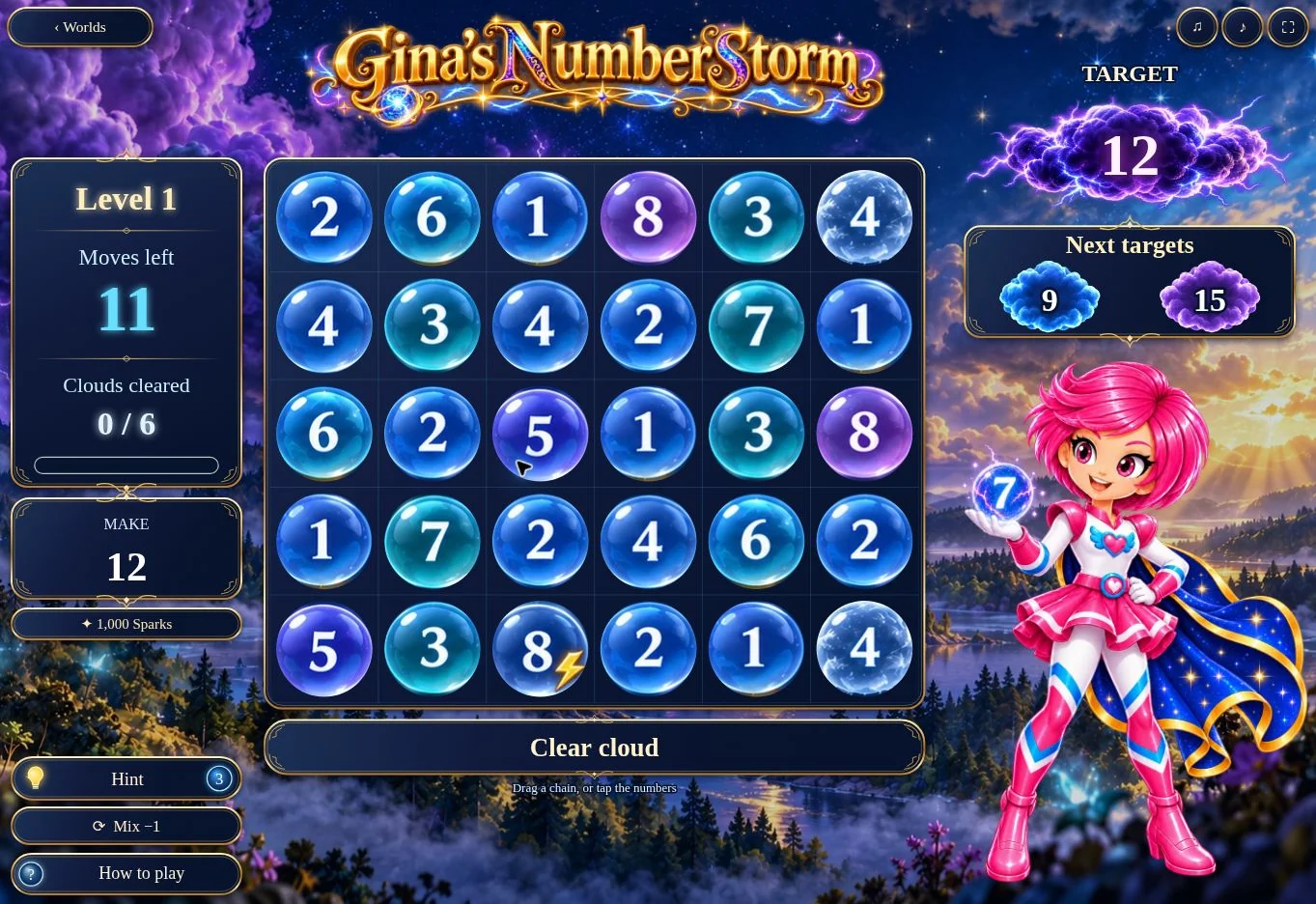
03 · Know your world
Objects & controls
Use this field guide alongside the picture and the labels inside the game.
- Target cloud
- The total to make now.
- Next targets
- The next two totals, shown in order from left to right.
- Ice
- An icy orb cannot be selected until a neighbouring chain clears it.
- Lightning
- Including a lightning orb gives back one move.
- Hint
- Three hints are available per level.
- Mix
- Rearranges the board and costs one move.
- Clear cloud
- Confirms the selected chain. The bar shows your running total.
04 · Your goal
Modes & passing levels
- One continuing puzzle journey, with no timer. Targets, cloud counts and ice increase gradually, then difficulty stabilises while new boards continue.
- Replay reached levels from the Levels menu. A level’s Sparks reward is awarded only once.
05 · A helping hand
Helpful tips
- Plan ahead using the upcoming cloud numbers.
- Use a hint before spending a move on Mix.
- Include lightning when its number fits your chain.
- A board with no available route is repaired automatically without using a move.
06 · Before you leave
Progress & Sparks
The game’s score, stars, hearts and magic are different from your family’s spendable Sparks. The app confirms any Sparks awarded under the current account rules, waiting periods and daily limits.
Use the game’s menu to leave and allow any save or reward confirmation to finish. If the app reports a connection or saving problem, keep that message in mind before closing. Guest saving can differ from signed-in profile saving.
These instructions do not unlock paid content or spend Sparks. The app shows the current preview and access options.